 |
uDiscMounter Virtual Drive & Disk Image Mounting Software. |
uDiscMounter is a software that creates a virtual drive on your computer. You can use it to mount disc image files and open them like real CDs or DVDs. The program is simple and easy to use, with a clean interface that makes managing your disc images feel natural. When you open it, everything is laid out clearly, so you can mount an image in just a few clicks.
The software has a graphical interface that makes handling disk images easier. You can load one or multiple image files, then choose which one you want to mount on your Windows system. Once mounted, it automatically creates a virtual drive. You can browse everything inside it directly through Windows Explorer, just like a real disc.
| Low System Requirements | |
| RAM | 2-5 MB |
| Storage | 10 MB |
| Operating Systems | |
| Windows : Vista/7/8/8.1/10/11 | |
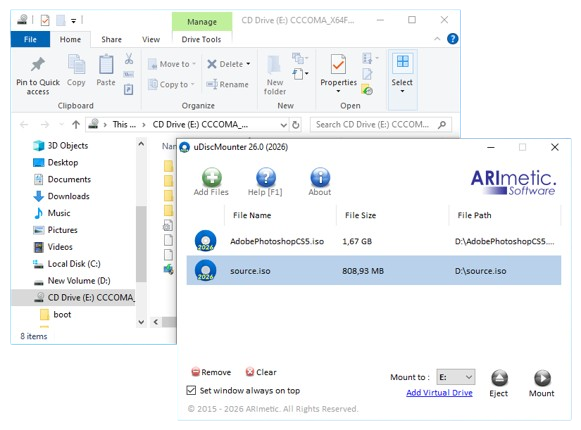
Capture: Main Window (@Windows 7 Ultimate )
Download uDiscMounter 26.2
| Download uDiscMounter 26.2 | ||
 |
Download | 1.9 MB |
| 3,000+ Downloads Across MajorGeeks, Softpedia, FileCR & More | ||
| Supported Format (Image Files) | ||
| .iso .bin .img .mdf .mds .nrg .daa .ccd .cdi .cif .dmg .isz .dao .tao .bwi .b5i .b6i .vc4 .vcd .fcd .ima .lcd .md1 .ncd .p01 .pxi .xmd .c2d .cue .gcd .gi .xa .xmf .ashdisc .vaporcd .uibak .vdi .000 .b5t .b6t .bif .bwt | ||
Help Content
►Operations : Mount & Eject files
►How to add a virtual drive in uDiscMounter
►uDiscMounter Command-Line Arguments
Frequently Asked Questions (FAQ)
►Can I integrate uDiscMounter as an underlying engine in my own application?
►Why is the number of virtual drives not updated after changing the setting?
►Why is uDiscMounter detected as a virus or malware by Windows Defender?